We put this tutorial together because we know that importing mods can be
tricky if you've never done it before or aren't used to the process.
This is the exact method we use to get everything working flawlessly.
🟢 Step 1: The Settings Directory
The very first thing we recommend to ensure your EA FC 26 mods work properly via FIFA Mod Manager is to rename your game settings directory. Why? Simply because conflicts can occur between the mod data and your existing save files, which might cause the mod to crash. By doing this, the game will generate a completely fresh and clean directory when it launches, restoring the original configuration.
Where can you find this folder? Usually at the following path:
C:\Users\xxxx\AppData\Local\EA SPORTS FC 26 (where "xxxx" is your Windows username)
Rename this folder to EA SPORTS FC 26-BACKUP. If you play Ultimate Team, you can always restore this backup folder later to get your original settings back.
🟢 Step 2: Live Editor
Aranaktu's Live Editor is essential because it hooks the FIFA Mod Manager into EA FC. Without it, the process is likely to fail. While it might work occasionally, experience tells us that in most cases, you cannot bypass the game's anti-cheat without Live Editor, meaning the game won't launch at all.
CRITICAL REMINDER: Always make sure you are OFFLINE on the EA App or Steam before doing this to prevent any risk of account bans.
- Download the Live Editor (you can get it here) and extract it to your drive.
- Run the Live Editor (
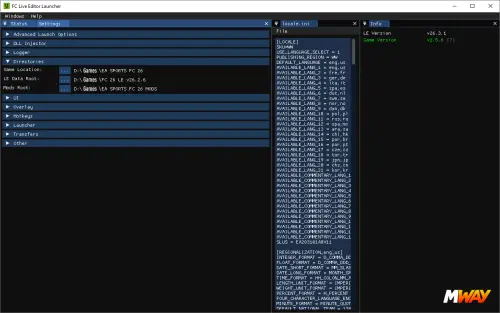
Launcher.exe inside its directory), go to Settings, and then select Directories.
- Make sure you input the correct paths:
- Game Location: Your main game directory.
- LE Data Root: Your Live Editor directory.
- Mods Root: A directory where Live Editor will dump some temporary files.
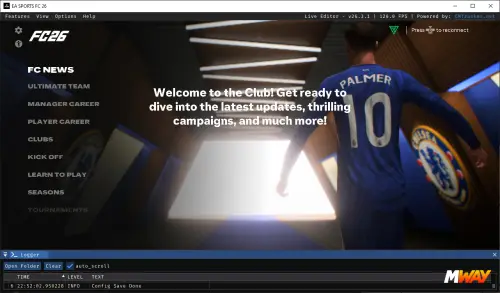
Next, let's test if EA FC 26 boots up properly with the Live Editor. Go back to the Status tab and click Run Game. EA FC 26 should launch (remember to stay offline!).
Once you reach the main menu, you should see the Live Editor overlay interface. This confirms that the Live Editor has successfully hooked into the game.
You can close it by pressing F9 to access the game normally. Since we don't need it right now, close both the game and the Live Editor.
🟢 Step 3: Mod Manager
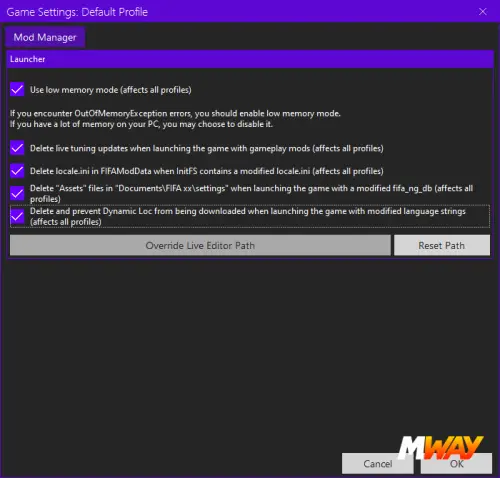
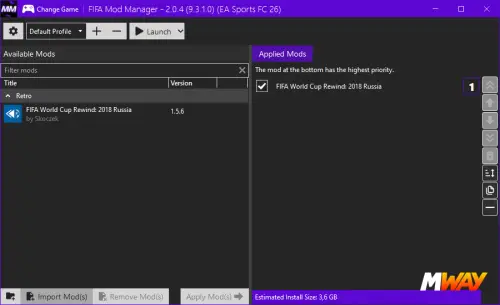
Download the Mod Manager here and extract the file to your drive. Run the Mod Manager and click on Settings (the gear icon). Leave the default options checked, but make sure to click on Override Live Editor Path, browse to your Live Editor folder, and select the Launcher.exe file inside it. Now the Mod Manager is fully prepared to use the Live Editor as a hook for the game.
🟢 Step 4: Installing a Mod
Now let's install and run a mod. We highly recommend the excellent Russia 2018 World Cup Mod developed by Skoczek, which allows you to play with the kits, squads, and atmosphere of that tournament (download it here). You will need the 2018 FIFA World Cup.fifamod file. Remember, any file ending in .fifamod can be imported into the game using the Mod Manager.
- Inside the Mod Manager, click on Import Mod(s) and select the Russia 2018 mod file. This process will take some time (potentially a few minutes).
- Once it finishes importing, click on Apply Mod(s). This will also take a moment to process.
🟢 Step 5: Launching the Game
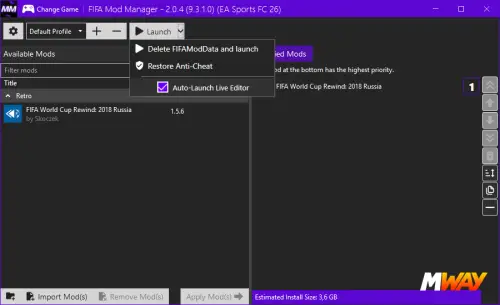
Our recommendation is to first open the Live Editor via Launcher.exe manually, but do not start the game from there. Instead, go to the Mod Manager and click Launch.
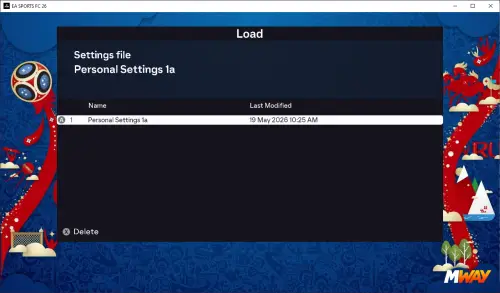
It will take a bit longer to load the first time, but the game should successfully boot up with the mod fully active!
Pro Tip: Inside the Mod Manager, right next to the "Launch" button, there is a small downward arrow. If you click it, you can check the box for Auto-Launcher Live Editor. This will automatically open the Live Editor whenever you run the Mod Manager, saving you from doing it manually next time. However, if that ever glitches out, just remember you can always manually run the Live Editor first, then the Mod Manager, and it will work perfectly every time.